
CoTrader reads your Interactive Brokers trade history through a Flex Query, a read-only report that IBKR generates on a schedule. Setup takes about five minutes, you do it once, and nothing in the process can place a trade. This guide walks through all of it.
CoTrader connects to one broker only, and that is on purpose. IBKR gives us clean, complete fill data: every entry, every exit, every commission, timestamped accurately. Callouts and your Weekly Review are only as good as the data behind them, and a trade history that's "mostly accurate" produces insights that are only "mostly useful." Going deep on one broker beat supporting a dozen at a shallower level.
Read-only, on purpose
CoTrader can see your trade history. It cannot place, modify, or cancel a single order. The Flex Query token you create below pulls one report and nothing else. It carries no trading permission of any kind, so your actual trading keeps happening in IBKR, exactly where it already does.
What you'll need
- An Interactive Brokers account with some trade history.
- IBKR Client Portal access, the browser login at interactivebrokers.com. These steps are not in TWS.
- About five minutes. You do this once.
By the end you'll have two values from IBKR, a Query ID and a Flex Web Service token, pasted into CoTrader.
In IBKR Client Portal
- Log in at interactivebrokers.com.
- Open Performance & Reports in the top menu, then the Flex Queries tab.
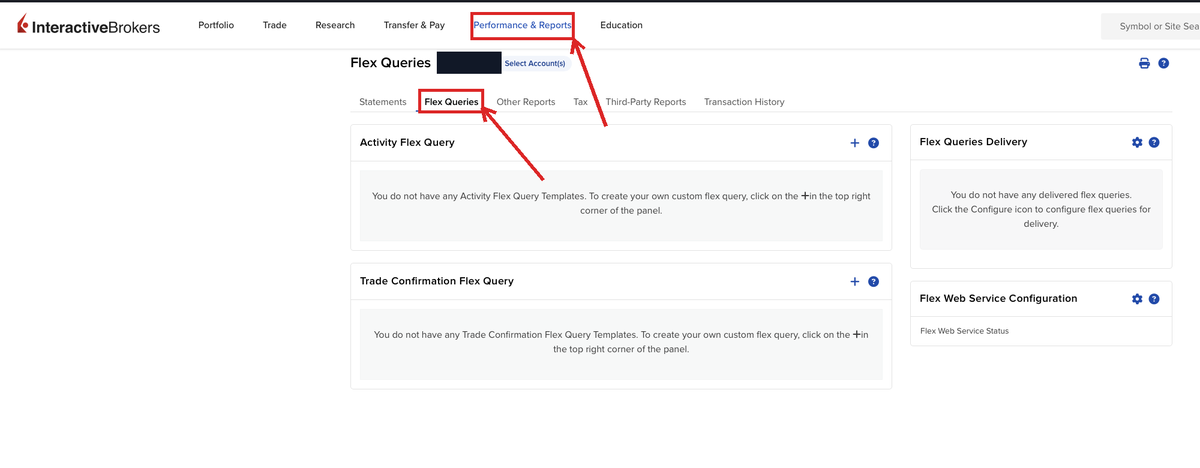
- In the Activity Flex Query panel, click +. Name the query CT3000 Activity.
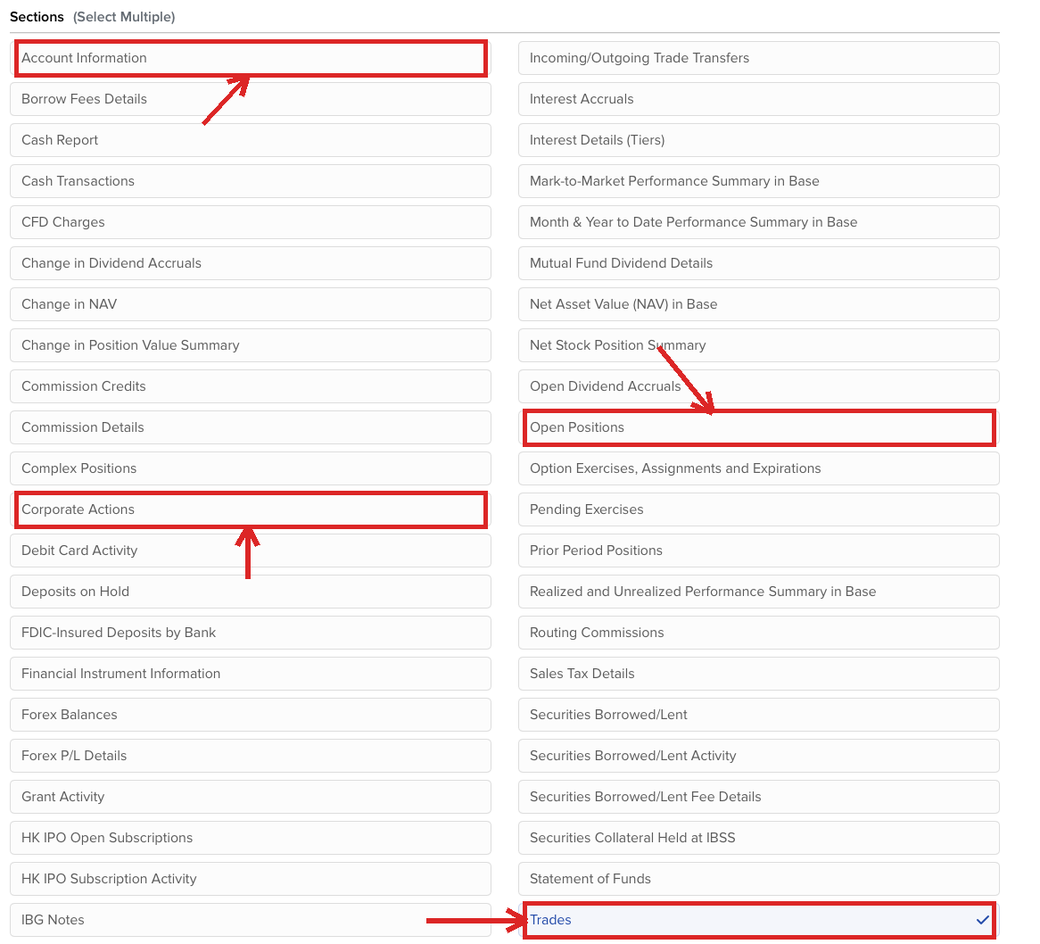
- Under Sections, tick Trades and Open Positions. These two carry your fills and your current holdings, and CoTrader needs both. Tick Account Information as well so it picks up your account's base currency. Ticking Corporate Actions too does no harm.
- Open each section you ticked and click Select All so every field comes through.
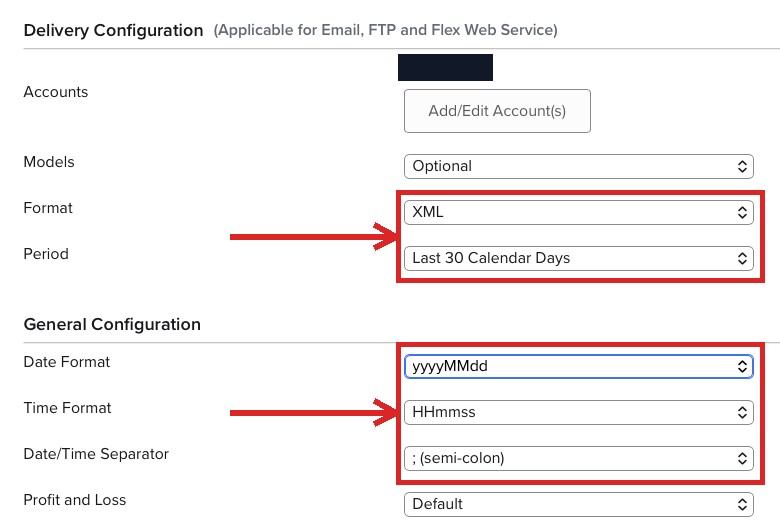
- Under Delivery Configuration, set Format to XML and Period to Last 30 Calendar Days. A longer period makes the sync fail with a message telling you to change it back.
- Under General Configuration, leave the date and time formats at their defaults: yyyyMMdd for the date, HHmmss for the time, ; semi-colon as the separator. CoTrader reads timestamps in exactly that shape, so a changed format means trades import with the wrong time or not at all. Save the query.
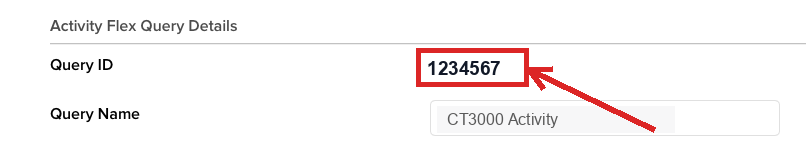
- Open the saved query's details and copy the Query ID, the number next to the name. That's your first value.
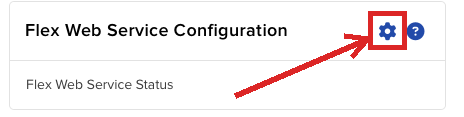
- Back on the Flex Queries page, click the gear on the Flex Web Service Configuration panel.
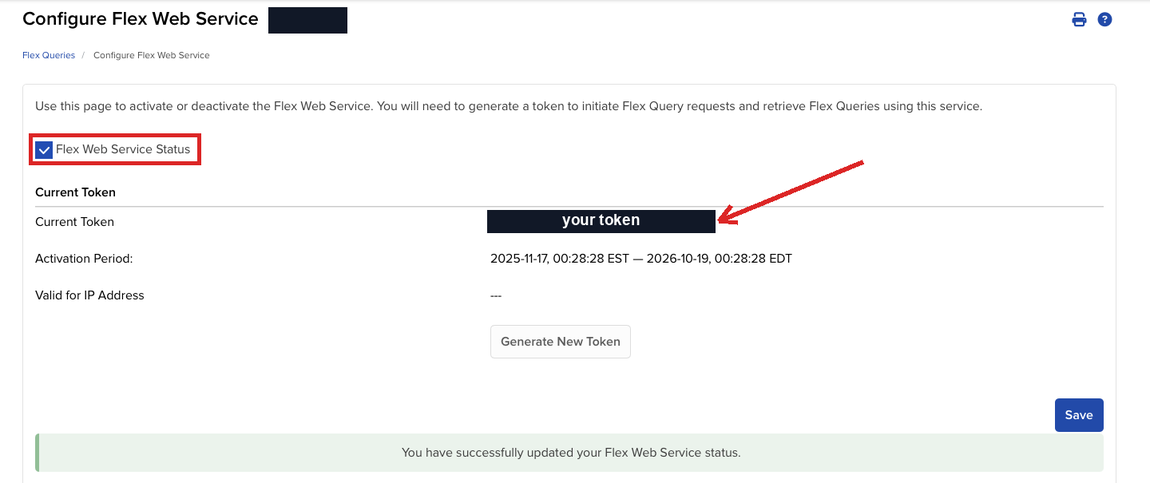
- Tick Flex Web Service Status, click Save, and copy the token (a long string of digits). That's your second value.
In CoTrader
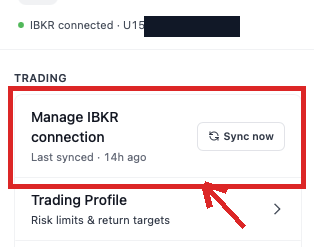
- Open the menu from the top right, then Trading → Manage IBKR connection.
- Paste the Flex Web Service Token into the first field and the Query ID into the second.
- Click Test first to check them. A working query comes back with Connection works and a count of the trades it found.
- Click Connect IBKR to save, then Sync now on the screen that follows. Your last 30 days import there and then.
That's it. You never open this screen again unless the token expires.
How the sync works after that
The Flex Query is a rolling 30-day window. In practice:
- On connect: your first Sync now imports the last 30 days of trades.
- After that: CoTrader re-runs the query the first time you open it each day, which always returns the most recent 30 days, and adds anything new to your history. Sync now is there any time you want it sooner.
- Over time: your record in CoTrader keeps growing, because CoTrader holds on to everything it has already pulled even though IBKR only ever serves the last month.
The one gap: trades from more than 30 days before you connected. IBKR will not return them through this query, so they stay in IBKR and don't appear in CoTrader.
 Recent activity
The sync lands in your activity feed each day. No CSV, no manual entry.
After you're connected
Once that first 30 days is in, the rest of CoTrader starts working straight away. Callouts can scan those trades immediately, and your first Weekly Review already has real numbers behind it instead of a week of waiting. Setup is the only manual step. After that the sync runs by itself, once a day, the first time you open CoTrader.
If a sync doesn't land
- Test first fails: re-check that the token and Query ID pasted cleanly with no trailing spaces, and that the Flex Web Service is still switched on in IBKR. CoTrader shows the exact message IBKR sent back, so a wrong period or a disabled service names itself.
- The sync mentions Open Positions: the Open Positions section isn't on the query. Add it, run Select All on it, and sync again.
- A recent trade is missing: IBKR usually publishes a fill 10 to 30 minutes after the trade, and same-day trades often only land after 4pm ET. Wait a bit and hit Sync now again. If it's still missing after that, confirm the Trades section is set to Select All.
- Older trades never appeared: expected. The query only reaches back 30 days, and your history builds forward from the day you connected.